
Recipes by kitchen equipment in a meal planning app
Looking for recipes by kitchen equipment, so the dishes you plan fit the oven, stovetop or air fryer you actually have? Here is how PantryWeave matches its suggestions to the equipment you save, where to set it up, and which catalog tags the recipes on this site carry.

Short answer: Yes, a meal planning app can work from your equipment. In PantryWeave you save the kitchen equipment you have in the Kitchen tab, and Chef, the recipe finder, matches its meal suggestions to it, along with the diners you pick in Who is eating?, judged on each recipe’s known ingredients, and the food already in your Kitchen. Equipment is stored with the kitchen; profiles hold each person’s allergens, diet and foods to avoid.
Is there a meal planning app that matches recipes to the kitchen equipment I have?
PantryWeave, the weekly meal planner for iPhone, which also runs on iPad, keeps two things apart: the people you cook for and the kitchen you cook in. A profile for each person in the household records what that person cannot or will not eat: allergens, diet and disliked ingredients. The equipment you own, say an oven, a stovetop and an air fryer, is saved in the Kitchen tab, alongside the food you keep in the fridge, the freezer, the pantry and on the counter.
Ask Chef for ideas and its suggestions are matched to both at once: the profiles of the diners you pick in Who is eating?, and your saved equipment. Chef works from each recipe’s known ingredients: for those diners it leaves out a dish whose known ingredients clash with their allergen groups, their chosen diet or a Never include or Avoid for now setting, while Prefer not to include lowers a dish’s place. How the two checks sit together in one suggestion is set out on our About page.
The other choices still apply
Equipment works alongside the rest of the Chef set-up: What are we preparing?, How much shopping? (Nothing extra, Short shopping or Flexible shopping), How much time? (15, 30 or 45 minutes) and Cuisine or origin. Nothing extra keeps the ideas to dishes the food in Kitchen already covers; Flexible shopping widens the pool to recipes that call for some shopping.
What is in Kitchen also shapes the order. If two recipes fit you equally, the one using food near its date comes first in the list from Chef: the same food the Use first shelf at the top of Kitchen brings forward. Chef does not move a recipe that suits you less ahead of one that suits you better.
Where to set it up in the app, step by step
From saving your equipment to a shopping list for the dishes you choose, in five steps.
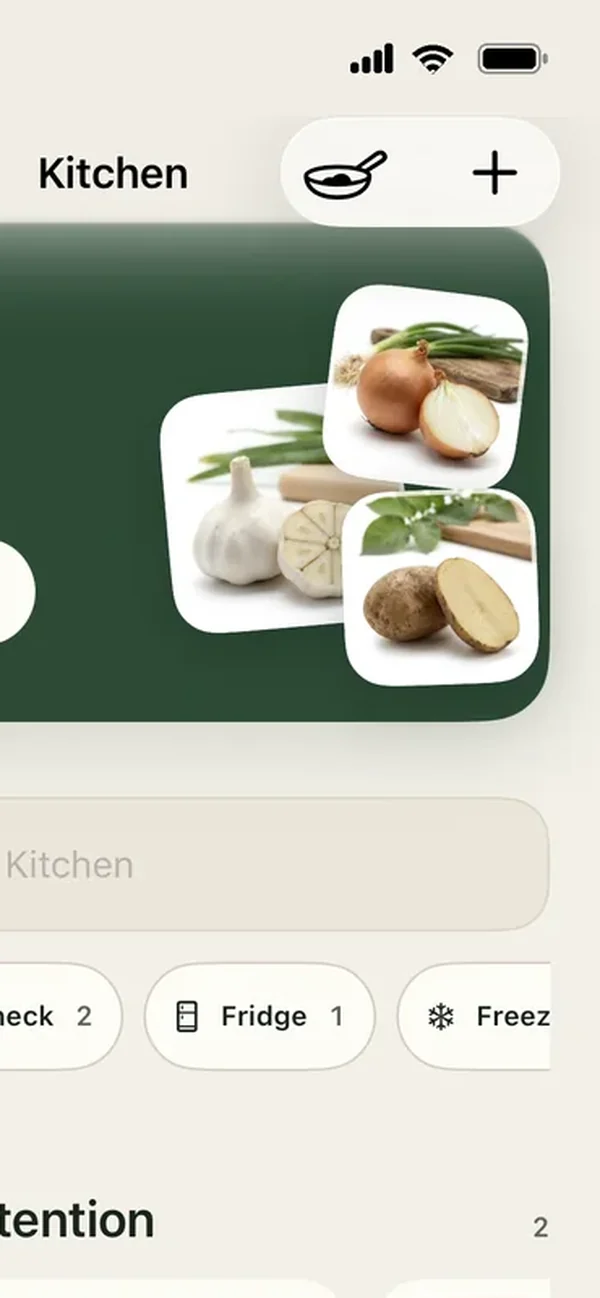
- Open Kitchen. It is one of the five tabs at the bottom of the screen: Today, Chef, Kitchen, Plan and Profile.
- Save your equipment. Tap the Kitchen equipment button at the top of the Kitchen screen and save what you cook with. It is kept with the kitchen itself, apart from the household’s profiles.
- Tell Chef who is eating. In Chef, tick tonight’s diners in Who is eating?. Guests with no profile of their own can join as well: the portions go up and the rules saved for your household stay in force.
- Narrow the ideas. Pick a meal such as dinner, then set How much shopping? and How much time?. The suggestions you get back are matched to your equipment and to those diners.
- Plan and shop. Mark the dishes you want and tap Create plan. Ingredients already in Kitchen are reserved for the planned meals, the shopping list adds up what those meals need minus what Kitchen holds, and taking a dish off the plan recalculates the list. In the shop, tick what you buy and tap Move to Kitchen.
Recipes on this site by catalog equipment tag
Where the catalog names equipment, the recipe page displays it. Of the 54 English recipe pages on this site, 50 carry such a catalog tag, and the list below groups them exactly as the tags are written.
- Stovetop (22 pages): Beef Doner over Rice, Beef and Potato Stew, Blistered Green Beans, Breaded Fried Chicken Bites, Béchamel Sauce, Cauliflower Stew with Minced Meat, Chicken Curry with Mushrooms, Chicken Fajita Wraps in Lavash, Chicken Fettuccine Alfredo, Chicken and Rice Pilaf, Chickpea Stew with Beef (its method uses a pressure cooker, or a regular pot that takes longer), Cowboy Chili, Mashed Potatoes, Mushroom Omelette, Pan-Fried Chicken Breast Bites, Plain Crepes, Red Lentil Köfte, Moulded with Bulgur, Rice Pudding with Red Berries, Salmon with Saffron and Shallots, Stuffed Bell Peppers with Ground Meat and Rice, Vanilla Custard, Vanilla Ice Cream (its method finishes in an ice cream maker)
- Oven (12 pages): Baked Chicken Drumsticks, Baked Chicken Thighs with Tomatoes and Peppers, Baked Chicken Wings, Cheese and Garlic Scones, Corn Bread, Focaccia Bread, Oatmeal Raisin Cookies (its method soaks the raisins in 50 ml of boiling water), Oven Roasted Potatoes with Rosemary, Pecan Pie Tarts, Spotted Dog Irish Soda Bread with Sultanas, Tray Börek, Yorkshire Pudding Recipe
- Oven, Stovetop (4 pages): Chocolate Chip Brownies, Cottage Pie, Leek Quiche, Teriyaki Chicken Wings
- Blender, Stovetop (2 pages): Carrot and Potato Soup, a Blended Vegetable Soup, Potato Soup
- Food processor, Oven (2 pages): Baked Falafel with Tahini Sauce, Baked Red Lentil Patties
- Grill, Stovetop (2 pages): Bubble and Squeak with Parsnips and Cabbage, Spinach and Zucchini Frittata
- Microwave (2 pages): Microwave Scrambled Eggs, Self-Saucing Chocolate Pudding (its method pours in 300 ml of boiling water)
- Food processor, Oven, Stovetop (1 page): Beyti Kebab
- Oven, Stand mixer, Stovetop (1 page): Chewy Chocolate Chip Cookies
- Pressure cooker, Stovetop (1 page): Lentil Soup
- Stand mixer, Stovetop (1 page): Fresh Dill Noodles
A tag summarises the recipe record; it is not the equipment list inside the app, and it does not always name every tool the method uses. The notes in brackets flag some examples where a method asks for more than its tag. Four recipe pages are not listed because their record names no equipment: Chickpea Salad with Harissa, Basil and Parsley Pesto, Roasted Pepper Green Lentil Salad and Whipped Cream, whose second step asks for an electric mixer.
Reading the tags against your own kitchen
The tags give a first sort, not a finished plan. 36 of the 50 tagged pages name a single piece of equipment: 22 carry the Stovetop tag alone, from Chicken and Rice Pilaf to Salmon with Saffron and Shallots, 12 the Oven tag alone and two the Microwave tag alone.
- Oven tag alone. Among the 12: Baked Chicken Thighs with Tomatoes and Peppers and Tray Börek.
- Oven and Stovetop tags only. 4 pages, such as Cottage Pie (1 hour 10 minutes in its record) and Leek Quiche (15 minutes of leeks on the stovetop, then 40 minutes in the oven, by its steps). They suit an evening with more time.
- Small appliances. A blender appears in two soup records, a food processor in Baked Falafel with Tahini Sauce, Baked Red Lentil Patties and Beyti Kebab, and a pressure cooker in Lentil Soup. If one of these is missing from your kitchen, save only what you have, and pick from the suggestions matched to it.
Before a dish goes on the plan, read its method as well as its tag: the bracketed notes above show four examples of recipes whose steps go beyond what the tag names. Kitchen keeps a list of the groceries stored at home, so with Nothing extra the dishes Chef offers are the ones that the food you have already covers.
Frequently asked questions
I only have an air fryer and a microwave. Which recipes on this site can I start from?
Two recipe pages here carry only the Microwave tag: Microwave Scrambled Eggs (10 minutes in its recipe record) and Self-Saucing Chocolate Pudding (8 minutes in the microwave on High, 800W, then 5 minutes standing; its method also pours in 300 ml of boiling water). No recipe page here carries an air fryer tag. For an oven dish such as Oven Roasted Potatoes with Rosemary, our air fryer conversion chart gives a lower temperature and a shorter time as a starting estimate, to check against the food as it cooks. In the app, save the air fryer and the microwave under Kitchen equipment in the Kitchen tab so that the suggestions from Chef are matched to them.
What does the Equipment line on a recipe page tell me?
It repeats the equipment that the PantryWeave catalog names for that recipe, written as the catalog writes it. Where the catalog names equipment, the recipe page displays it; three recipe pages here have no such line, and Whipped Cream shows one taken from its second step because its record names none. The tag is a summary, so read the method too: a recipe can call for a tool or for boiling water that the tag leaves out.
Why is Vanilla Ice Cream listed under Stovetop?
Because Stovetop is the only equipment its catalog record names: the custard base is cooked in a saucepan. Its last step, though, freezes the chilled mixture in an ice cream maker, so with a stovetop alone you can make the base but not finish the ice cream.
Related guides

Plan meals your kitchen can cook
Download PantryWeave on the App Store, save your equipment in the Kitchen tab and let Chef suggest the first dinners.

Free to start · iPhone