

A grocery list with only what’s missing
The third jar of cumin. The onions you already had. A pantry-adjusted list starts from your meal plan and subtracts what is at home before you leave.

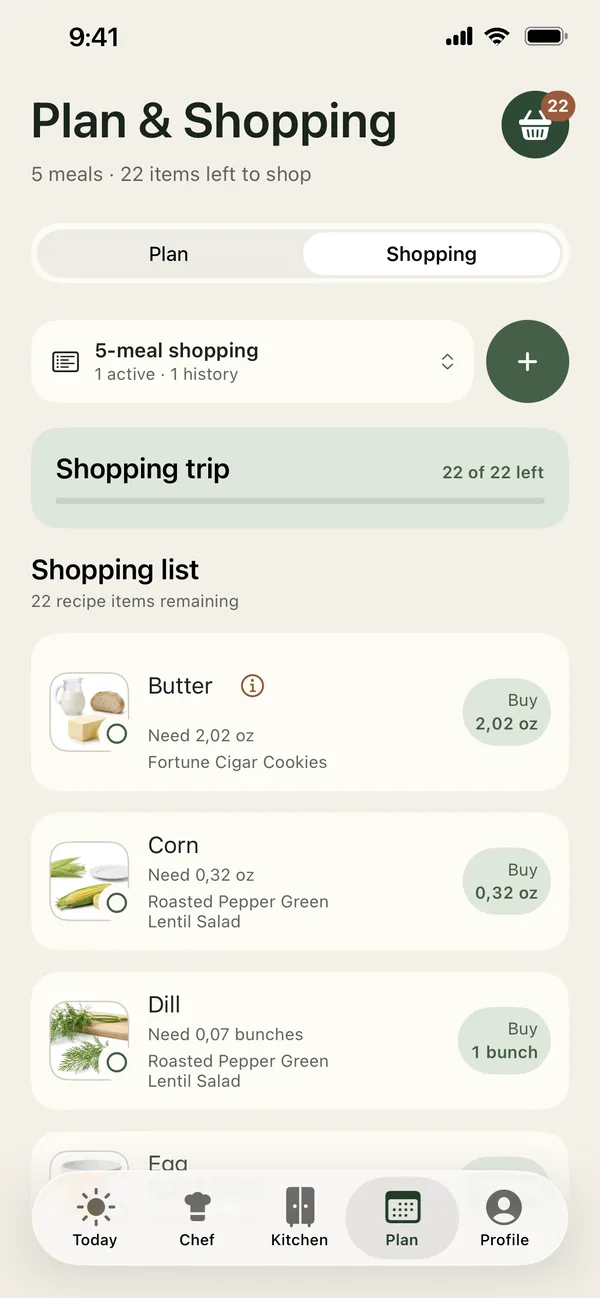
Short answer: Build the list from your meal plan, add up what each recipe needs, and subtract what is already in your fridge, freezer and pantry before you shop. PantryWeave does this for you: it combines the amounts from your planned meals, removes what your Kitchen already covers, and moves what you buy back into your Kitchen when you finish.
Why we keep buying what we already have
Most shopping lists are written from memory, in a hurry, away from the cupboard. We add “onions” because the recipe needs them, not because we checked. Multiply that by a week of recipes and the duplicates add up — and so does the food that goes off before we get to it.
A good list does three things: it combines what every recipe needs, subtracts what you already own, and leaves you with the gap.
What subtracting looks like
The same week of recipes, before and after checking the kitchen.
| Ingredient | Recipes need | Already at home | On your list |
|---|---|---|---|
| Onions | 3 | 2 | 1 |
| Chickpeas | 2 cans | 2 cans | — |
| Spinach | 300 g | 0 g | 300 g |
| Lemons | 2 | 1 | 1 |
| Parmesan | 60 g | 100 g | — |
| Rice | 400 g | 1 kg | — |
Six ingredients across the week’s recipes become three items to buy.
A five-step routine
- Plan first. Decide the meals before writing the list, so the list follows the plan rather than the aisles.
- Combine amounts. Two recipes that each need an onion need two onions, not two lines that say “onion”.
- Subtract what is at home. Check fridge, freezer and pantry — especially staples like rice, pasta, tins and spices.
- Add the non-recipe items. Washing-up liquid and breakfast cereal belong on the list too; keep them separate from recipe ingredients.
- Put the shopping away into your inventory. What you bought is what you have next week.
Staples that cause the most duplicates
Duplicates cluster around long-life staples: spices, tins of tomatoes and pulses, rice, pasta, stock and oils. They are cheap enough that we buy “just in case”, and they hide at the back of the cupboard. Checking just these before a shop catches most duplicate buys.
Fresh produce is the opposite problem: we under-check it because it feels obvious, then buy a second bag of spinach while the first one wilts. Let the plan decide how much you need, and let the inventory say how much you have.
How PantryWeave helps
Only the shortfall after your Kitchen has been accounted for appears on the list.
Amounts combined, stock subtracted
Recipe amounts are combined and what is already in Kitchen is subtracted.
Check off as you go
Tick items off in the shop. When you are done, Add checked groceries and finish moves them into Kitchen.
Linked to your week
The list follows the meals in your plan, so changing a dinner changes what you need.
Know what you have
Kitchen holds what is in the fridge, freezer, pantry and on the counter, with optional amounts.
Free and Premium. You can start free with one profile, a three-evening starter plan each week and a single shopping list. Premium unlocks the full week, more household profiles and every profile-checked result.
Frequently asked questions
Can I share the shopping list with someone else?
Not yet. Shared lists are planned for a later version. Today the list lives on your iPhone.
Does PantryWeave compare prices or track spending?
No. PantryWeave helps you buy only what your plan is missing. It does not show prices or savings.
What happens to the groceries I bought?
When you finish, the checked items are added to your Kitchen, so the next plan knows you have them.
Related guides

Shop for the gap, not the whole recipe
Download PantryWeave on the App Store and plan your first week from what you already have.

Free to start · iPhone