


One weekly plan that works for everyone at your table
When one child has a peanut allergy, one adult is vegetarian and someone refuses mushrooms, dinner turns into a puzzle. This guide shows how to plan a family week that respects every rule — and where PantryWeave does the checking for you.

Short answer: Give every person their own rules first — allergens, diet and the foods they won't eat — then plan only meals that fit all of them, starting from what is already in your kitchen. In PantryWeave each person gets a profile, and recipes that pass every profile are marked “Suitable for everyone”, so nobody has to skip dinner.
Why family meal planning keeps breaking down
Most recipe apps ask for one diet for the whole account. Real households don’t work like that. A typical table mixes hard rules — an allergy, a vegetarian diet — with softer ones: the teenager who won’t eat mushrooms, the adult cutting back on red meat this month.
Every extra rule shrinks the list of dinners everyone can eat. Without a plan, families fall back on the same five meals, cook two dinners in parallel, or buy ingredients for recipes that someone at the table can’t have. All three cost time, money and food.
The fix is not more recipes. It is a clear picture of each person’s rules, a short list of meals that fit all of them, and a week built from what is already in the kitchen.

A five-step method for planning the family week
- Write down each person’s hard rules. Allergies and diets first, one line per person. Keep these separate from preferences, because they are not negotiable.
- Add preferences as a second layer. “Doesn’t like mushrooms” is different from “can’t eat peanuts”. Preferences can lower a meal’s priority without ruling it out.
- Find the overlap. Look for dinners everyone can eat as written: bean chilli, vegetable fried rice, lentil soups, traybakes, pasta with a vegetable sauce. Overlap meals are the backbone of the week.
- Start from the fridge. Before choosing recipes, check what needs using. Put the most perishable ingredients into the first two or three dinners.
- Shop once, for the gap. Combine what the recipes need, subtract what you already have, and buy only the difference.
Hard rules versus preferences
Treating every dislike as an allergy makes planning impossible; treating an allergy like a dislike is dangerous. Two tiers keep the plan realistic: anything that must never appear, and anything you would rather skip but can live with now and then.
A sample week for a mixed table
Seven dinners, one menu. Most of them share ingredients so nothing is bought for a single meal.
| Day | Dinner idea | Why it fits this table |
|---|---|---|
| Mon | Chickpea and spinach curry with rice | Vegetarian, no peanuts in the recipe, uses up spinach early in the week |
| Tue | Lemon pasta with peas and parmesan | Quick, vegetarian, no mushrooms |
| Wed | Bean and sweet potato tacos | Shared base; anyone can add toppings at the table |
| Thu | Vegetable fried rice with egg | Uses cooked rice from Monday |
| Fri | Tomato and lentil bolognese | Freezes well for a later lunch |
| Sat | Roast vegetable traybake with halloumi | One tray, leftovers become Sunday lunch |
| Sun | Leftovers night | Clears the fridge before the next shop |
Example household: one vegetarian adult, one child with a peanut allergy and one adult who dislikes mushrooms. Check every packaged ingredient (curry paste, stock, tortillas) for the allergens that matter to you.
How PantryWeave helps
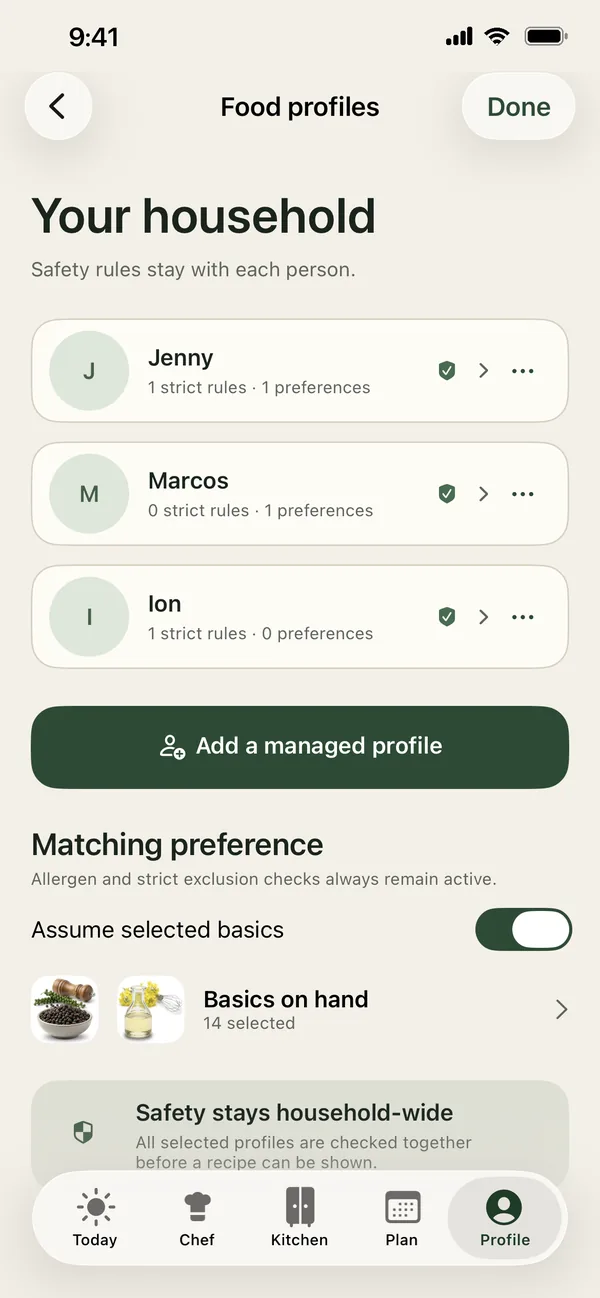
PantryWeave keeps every person’s rules in one place and checks each suggestion against all of them.
One profile per person
In Profile, each person gets their own Allergens, Diet and ingredient rules: Never include, Prefer not to include and Avoid for now.
Profile-checked recipes
Suggestions are checked against every saved profile at once. A recipe that passes is marked Suitable for everyone.
Starts from your kitchen
Recipes are matched to what you added in Kitchen. Each result shows Ready or how many items are left to buy.
A list for the gap only
Recipe amounts are combined and what is already in Kitchen is subtracted, so the list only holds what is missing.
Free and Premium. You can start free with one profile, a three-evening starter plan each week and a single shopping list. Premium unlocks the full week, more household profiles and every profile-checked result.
Frequently asked questions
Can each family member have their own allergies and diet?
Yes. In Profile, each person has their own allergens, diet and ingredient rules. Recipes are checked against all saved profiles at once. Allergy-related results are informational, so always check labels and preparation.
What is the difference between Never include and Prefer not to include?
Never include removes recipes that contain the ingredient. Prefer not to include keeps those recipes but ranks them lower. Avoid for now is a temporary rule you can switch off later.
Does PantryWeave make a different version of the meal for each person?
No. PantryWeave looks for recipes that suit everyone as written. You can still add toppings or sides at the table yourself.
Is PantryWeave free for families?
You can start free with one profile and a three-evening starter plan each week. Premium unlocks the full week, more household profiles and every profile-checked recipe.
Can my partner open the same plan on their phone?
Not yet. Shared lists and separate sign-ins are planned for a later version. Today the plan lives on one iPhone.
Related guides

Plan a week everyone at your table can eat
Download PantryWeave on the App Store and plan your first week from what you already have.

Free to start · iPhone