


Pantry, fridge and freezer inventory that plans your meals
An inventory is only worth keeping if it changes what you cook. Here is what to track, how to set it up in ten minutes, and how PantryWeave turns it into meals.

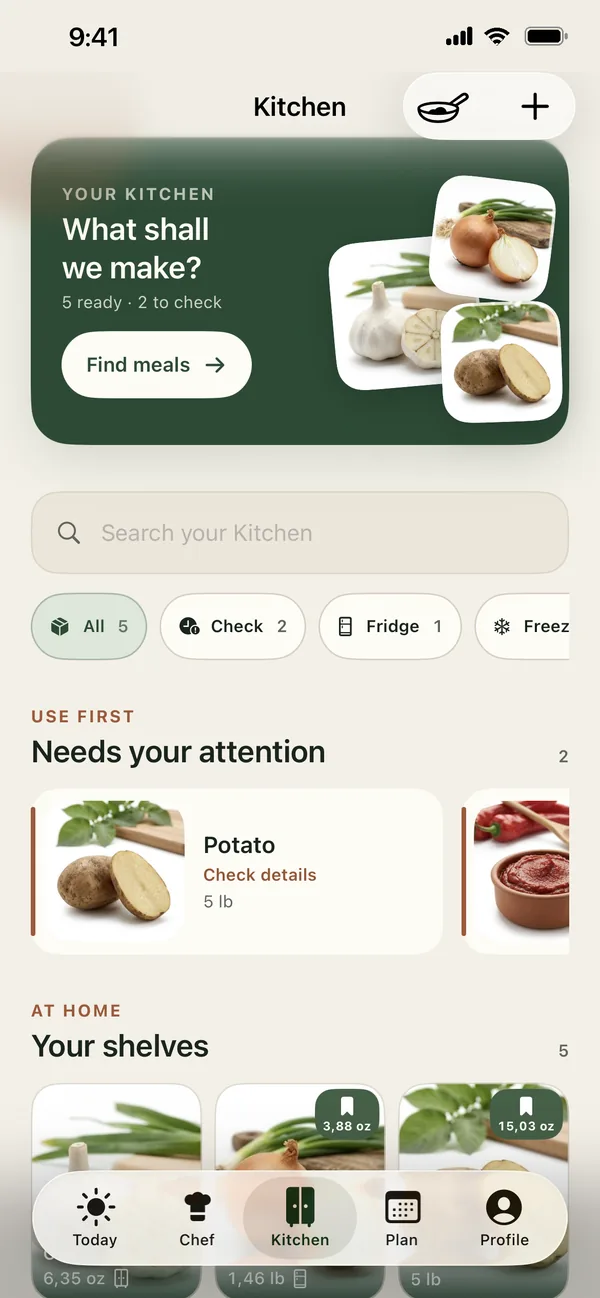
Short answer: Keep one list of what is in your fridge, freezer, pantry and on the counter, with rough amounts, and update it when you cook or shop. In PantryWeave, Kitchen holds those items, suggests where each one is stored, adds freshness checks with a Use first shelf, and feeds both recipe suggestions and the shopping list.
Track less, use it more
Inventories fail when they try to be perfect. You do not need every spice and condiment logged to the gram. You need the ingredients that decide dinner — proteins, fresh vegetables, the staples you run out of — and a rough idea of how much is left.
A light inventory answers the two questions that matter: what can I cook tonight, and what do I need to buy?
Why it matters for food waste
Food is usually wasted for two reasons: we forget we have it, or we buy it again. An inventory fixes both. Seeing what needs using first shapes the first dinners of the week, and knowing what is already on the shelf keeps it off the shopping list.
It also makes weeknight decisions faster. Instead of opening every cupboard at six o’clock, you start from a list of what is actually there.
What to track in each zone
A ten-minute first pass, one zone at a time.
| Zone | Worth tracking | Usually skip |
|---|---|---|
| Fridge | Fresh vegetables, dairy, opened sauces, leftovers | Condiments you always have |
| Freezer | Proteins, frozen vegetables, batch-cooked meals, bread | Ice, single odd items |
| Pantry | Rice, pasta, tins, pulses, flour, stock | Salt, pepper, everyday oils |
| Counter | Fruit, potatoes, onions, tomatoes | Decorative items |
A ten-minute first set-up
- Fridge first (four minutes). Add fresh vegetables, dairy, opened sauces and leftovers. These decide this week’s dinners.
- Freezer (three minutes). Add proteins, frozen vegetables and anything batch-cooked.
- Pantry and counter (three minutes). Add rice, pasta, tins and pulses, then potatoes, onions and fruit.
Stop there. Spices and condiments can wait until a recipe asks for them.
Keeping it accurate without effort
- Update after the shop. Put groceries into the inventory as you put them away.
- Update after cooking. When a meal uses something up, take it off.
- Amounts are optional. “Some rice” is better than nothing; add amounts for the things you run out of.
- Do a two-minute check before planning. Glance at the fridge and correct anything that looks wrong.
How PantryWeave helps
Kitchen is the starting point for Chef, Plan and Shopping.
Add from a reviewed catalog
Search the ingredient catalog and add an optional amount with sensible units. Storage is suggested automatically.
Filter by place
Switch between All, Check, Fridge, Freezer, Pantry and Counter.
Freshness checks
Freshness checks and a Use first shelf. Badges like Use in 2d and the Check filter show what needs using first.
Connected to recipes
Chef shows how many recipes are Ready from your Kitchen, and planned meals reserve the stock they need.
Private by default. Saved Kitchen data is encrypted on your iPhone and readable offline.
Frequently asked questions
Can I scan barcodes or receipts?
No. You add ingredients by searching the catalog. Barcode and receipt scanning are not available.
Do I need to enter exact amounts?
No. Amounts are optional. When an amount is uncertain, a recipe can show Check amount so you can confirm before cooking.
Is my kitchen data private?
Saved Kitchen data is encrypted on your iPhone. When a recipe or plan request needs it, the request is sent over HTTPS and not kept as a profile.
Does the inventory update itself after I shop?
When you finish a shopping list, the checked items are added to Kitchen. After cooking, you choose whether to deduct what you used.
Related guides

Let your kitchen decide tonight’s dinner
Download PantryWeave on the App Store and plan your first week from what you already have.

Free to start · iPhone