


Grocery list template: a printable grocery list for the week
One page with a box for each part of the store, room to write amounts and a corner for what is already at home. Print it, fill it in from your meal plan and tick items off as you shop.

To print it: use your browser’s Print command (Ctrl+P, or ⌘P on a Mac). Only the list below prints, on one page. In the UK and Australia this is usually called a shopping list template; it works the same way.
Download it free: PDF, US Letter · PDF, A4 · editable sheet (.xlsx) for Google Sheets, Excel or Numbers · Word (.docx). Each one is the same one-page list.
Grocery list
Week of
Fruit and vegetables
Meat, fish and eggs
Dairy
Bakery
Pantry and tins
Frozen
Drinks and snacks
Household
Meals this week
Already at home
How to use the template
- Plan the meals first. Write the week’s meals in “Meals this week”, or plan them on the meal planner template.
- Check what is at home. Look in the fridge, freezer and cupboards and note what you already have under “Already at home”.
- Write only the gap. For each meal, add what is missing to the right box and combine amounts: two recipes that each need an onion need two onions on one line.
- Add the extras. Breakfast, snacks and household items have their own boxes, so they are not forgotten.
- Tick as you shop. Take the sheet, or a photo of it, to the store and tick each line as it goes in the basket.
A filled-in example list
Three dinners from recipes on this site: beef and potato stew on Monday, chickpea stew with beef on Wednesday and roasted pepper and green lentil salad on Friday. Amounts are combined, and what was already at home stays off the list.
| Box | On the list | Why |
|---|---|---|
| Fruit and vegetables | 2 potatoes, 1 onion, 1 red onion, 2 red bell peppers, 1 small bunch of dill, 1 lemon | The two stews need an onion each; one was already at home |
| Meat, fish and eggs | 750 g beef | 400 g for the stew and 350 g for the chickpea stew, on one line |
| Pantry and tins | 300 ml chickpeas, 200 ml green lentils, 2½ tbsp red pepper paste, corn, pickled cucumbers | Red pepper paste for both stews, combined |
| Already at home | Olive oil, salt, black pepper, paprika, ground cumin, 1 onion | Not on the list |
The automatic version
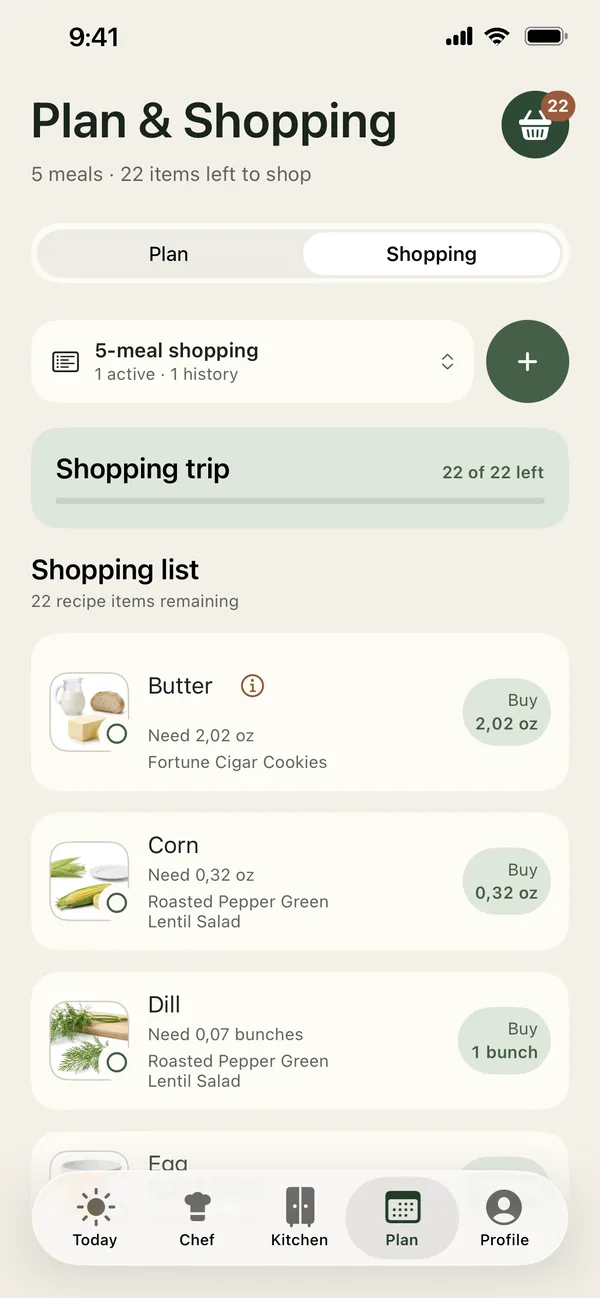
PantryWeave writes this list for you, from the meals you plan.
Built from your week
Plan the meals and the list follows: amounts from every recipe are combined, and what is already in Kitchen is subtracted and shown as Already in Kitchen. Remove a meal from the plan and the list updates too.
Tick it, then Move to Kitchen
Tick items as you shop, then tap Move to Kitchen. They join your stock with a storage place and a freshness date: two touches, with no barcode to scan.
Your units
Choose Metric or US customary, with everyday measures such as cups and pieces. A different pack size? Correct it in Purchase amount.
Checked for your household
Tap an item to see which person’s allergy or ingredient rule it relates to. The note ends with: “Check the label and ingredient list of the product you buy.”
Frequently asked questions
What should a grocery list template include?
A box for each part of the store, room to write amounts, a place for the week’s meals and a note of what is already at home, so you only buy the gap. This sheet has all of them on one page.
How do I make a grocery list for the week?
Plan the meals first, check what you already have, then write down only what is missing, combining amounts across recipes. Group the items by grocery list categories, such as fruit and vegetables or pantry and tins, so the trip through the store is quicker.
Can a grocery list be made automatically?
Yes. In PantryWeave the list is built from the meals you pick for the week: amounts are combined, what is already in your Kitchen is subtracted, and removing a meal from the plan updates the list. In the store you tick items off, then tap Move to Kitchen.
Is there a free printable grocery list?
Yes. This grocery list template is free: print it from this page, or download it as a PDF in US Letter or A4 size. There is also an editable sheet (.xlsx) for Google Sheets, Excel or Numbers, and a Word file.
Can I edit the grocery list template in Google Sheets or Word?
Yes. Download the .xlsx file and open it in Google Sheets (File, then Import), Excel or Numbers, or download the Word file. Type your items, then print the list or keep it on your phone.
Related guides

Let the list write itself
Download PantryWeave: plan the meals, and the grocery list is built for you with only what is missing.

Free to start · iPhone