

Plan to Eat alternative: PantryWeave vs Plan to Eat
Plan to Eat is a meal planning app. If you are looking for a Plan to Eat alternative that starts from what is already in your kitchen, PantryWeave plans for the people you choose in Who is eating?, guests included, in one simple app.

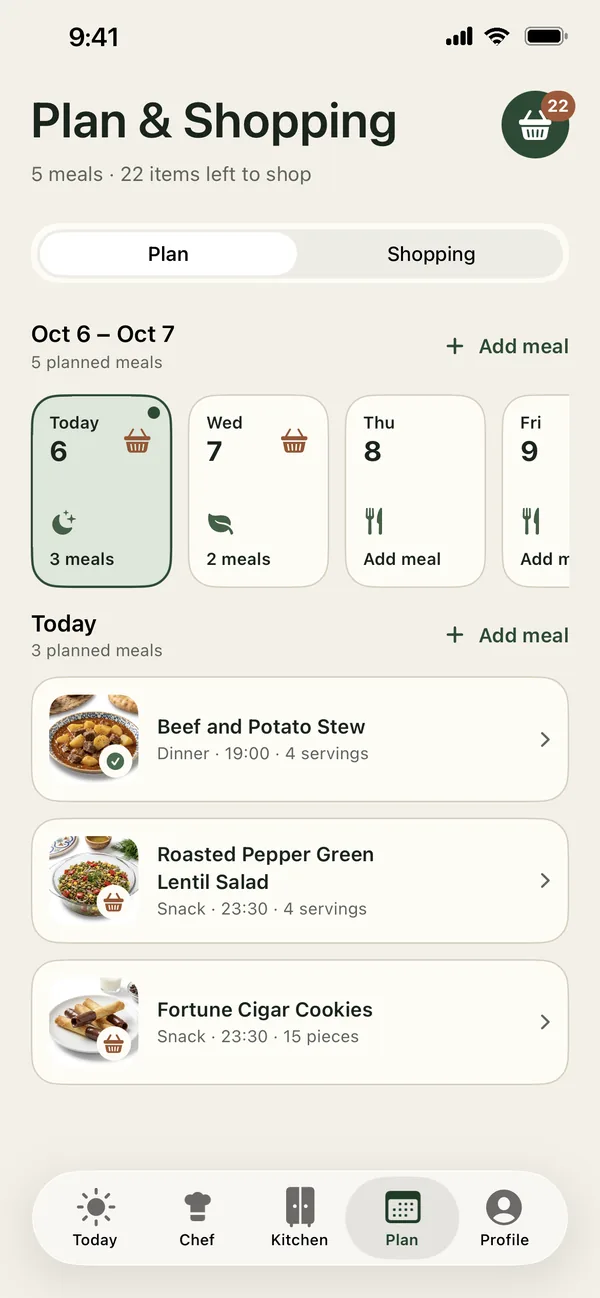
Short answer: Plan to Eat describes itself as “the meal planning app designed with the planner in mind”: store your recipes, plan your meals and “auto-generate a shopping list for your week”. PantryWeave starts from your Kitchen and the people at your table. Chef shows whether each recipe is Ready with what you have or how many items you would need to buy, the week is planned from what you already have, and the grocery list holds only what is missing.
Two different starting points
Plan to Eat’s website and App Store listing put your saved recipes and your planner first. You keep your recipes in one place, the meal planning calendar “lets you plan ahead for any length of time”, and the shopping list “auto-generates an organized grocery list based on the ingredients in your meal plan”.
PantryWeave puts your kitchen inventory and the people eating first. Each person gets a profile with their diet, 13 allergen groups and ingredient rules. Choose who is eating, guests without a profile included, and their saved diets, allergens, ingredients to avoid and kitchen equipment filter and explain the results, with portions scaled to match. Chef then shows whether each recipe is Ready with what you have or how many items you would need to buy.
You pick the recipes, and the week is planned from what is already in your Kitchen. Recipe amounts are combined and what is already in Kitchen is subtracted, so the grocery list holds only what is missing. When you mark a meal as cooked, you choose whether PantryWeave deducts its ingredients from Kitchen stock or keeps Kitchen unchanged.
For the questions worth asking any planner, see how to choose a meal planning app, and our comparison of other meal planners for more apps side by side.
Feature-by-feature comparison
The features that matter when every person at your table eats a little differently, side by side.
| Feature | PantryWeave | Plan to Eat |
|---|---|---|
| A profile for each person: diet, 13 allergen groups, ingredient rules | ✓ | — |
| Choose who is eating, guests included; portions scaled to match | ✓ | You can scale servings |
| Results explained for each person at the table | ✓ | — |
| Leave an ingredient out, or move it further down | ✓ | — |
| Results filtered by your kitchen equipment | ✓ | — |
| Filters for cooking time, cuisine, and country or region | ✓ | Search your recipe book based on title, ingredients, course, main ingredient, tags |
| Recipes from what you already have | ✓ | — |
| Cook with what you have: each result shows Ready or how many items to buy | ✓ | — |
| Choose Nothing extra, Short shopping or Flexible shopping | ✓ | — |
| Kitchen inventory that shows where each item should be stored, with a Use first shelf | ✓ | — |
| Weekly plan from what you already have | ✓ | Plan a week, a month or longer |
| Grocery list with only what is missing | ✓ | Built from your meal plan and organized by store and aisle |
| Mark a meal as cooked and choose whether Kitchen stock is deducted | ✓ | You can now mark meals as done on the Planner |
| Estimated calories, protein, carbohydrates and fat per serving | ✓ | Nutrition facts for your recipes and daily totals on your planner |
Competitor information as of November 15, 2026, from Plan to Eat’s own website, its pricing page and its App Store listing. Text in the Plan to Eat column is Plan to Eat’s own wording; “—” means the feature was not confirmed in those sources. Features can change after that date. Plan to Eat is a trademark of its owner; PantryWeave is not affiliated with Plan to Eat, LLC or Plan to Eat.
What Plan to Eat says it offers
In its own words, on its website and App Store listing as of November 15, 2026:
- Devices: “iPhone, Android and the web, always in sync.”
- Adding recipes: “Tap the share icon in your web browser to import recipes from the web, or enter your family recipes manually in the app.”
- Cooking: “Step-by-step cooking with your screen kept awake and named timers.”
- Sharing: “One account for the family, on as many devices as you like”, and you can “share recipes and saved menus” with friends and family.
- Price model: “Start with a free 14-day trial.” After that, a subscription: “No tiers, no add-ons, no ads. One subscription unlocks all of it.”
What PantryWeave brings to your table
Start from what matters most in your home. PantryWeave covers it, along with everything else on this page, in one simple app.
If you want a shorter shopping list
You pick the recipes and the week is planned from your Kitchen. Recipe amounts are combined and what is already in Kitchen is subtracted, so the list holds only what is missing.
If everyone eats differently
Each person gets a profile with their diet, 13 allergen groups and ingredient rules. Recipes are checked for the people you choose in Who is eating?, using each recipe’s known ingredients.
If guests join you
Choose who is eating, guests without a profile included, and the portions are scaled to match.
If you want to cook from what you have
Chef shows whether each recipe is Ready with what you have or how many items you would need to buy. Choose Nothing extra, Short shopping or Flexible shopping.
If you keep favorite recipes
Save recipes to your Cookbook from the recipe screen, and open them again from Today.
If you keep an eye on calories
Each recipe shows estimated calories, protein, carbohydrates and fat per serving, so you can pick meals with calories in mind.
Switching from Plan to Eat?
Your saved recipes and plans live in Plan to Eat. PantryWeave adds a plan that starts from your Kitchen and the people at your table. With PantryWeave you get:
- A profile for each person, with diet, 13 allergen groups and ingredient rules
- Results filtered and explained for whoever is eating, guests included
- Recipes from what is already in your Kitchen, each showing Ready or how many items to buy
- A week planned from your Kitchen, with one grocery list of only what is missing
- A Kitchen that shows where each item should be stored, with a Use first shelf
- Kitchen stock that updates when you move your shopping in and, if you choose, when you mark a meal as cooked
Frequently asked questions
PantryWeave vs Plan to Eat: which is for me?
Plan to Eat describes itself as the meal planning app designed with the planner in mind: save your recipes, plan your meals and get a grocery list built from the plan. PantryWeave starts from what is already in your Kitchen and from the people at your table: when you choose who is eating, their saved diets, allergens, ingredients to avoid and kitchen equipment filter and explain the results, and each recipe shows Ready with what you have or how many items you would need to buy.
Can PantryWeave plan my week from what is already in my kitchen?
Yes. You pick the recipes and plan the week from what is already in your Kitchen, and PantryWeave produces one grocery list for the week with only what is missing: recipe amounts are combined and what is in Kitchen is subtracted. When you mark a meal as cooked, you choose whether PantryWeave deducts its ingredients from Kitchen stock or keeps Kitchen unchanged.
Can each person in my family have their own profile?
Yes. In PantryWeave each person gets a profile with their diet, 13 allergen groups and ingredient rules: Never include, Prefer not to include and Avoid for now. Choose who is eating, guests without a profile included, and their saved diets, allergens, ingredients to avoid and kitchen equipment filter and explain the results.
Is PantryWeave free?
You can start for free.
Related guides

Plan for everyone at your table
Download PantryWeave on the App Store and plan your first week from what you already have.

Free to start · iPhone